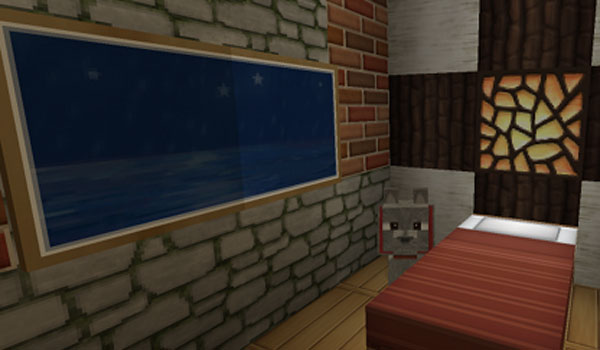
Bueno, perdón por la tardanza pero estoy aún en exámenes. Este mod es el Village Taverns Mods para 1.5.2.
Descargan Minecraft Forge 1.5.2 (ya lo puse en publicaciones anteriores), luego descargan Village Taverns Mod 1.5.2, buscan %appdata% en el buscador y abren Roaming, luego el archivo .minecraft/bin/minecraft.jar , pegan los archivos de Forge dentro de “minecraft.jar”.Luego borran la carpeta META-INF y finalmente pegan el archivo descargado del mod, dentro de .minecraft/mods.
Link: https://www.dropbox.com/s/jhf3s0zilywph0p/taverns-20-Jun-2013.zip
Well, sorry for the lateness but I am still in exams. This mod is the Village Taverns Mods for Minecraft 1.5.2. First download Minecraft Forge 1.5.2 (already I put it in previous publications), then download Village Taverns Mod 1.5.2, look for %appdata% in the searcher and open Roaming, then the file .minecraft/bin/minecraft.jar, paste Forge's files inside "minecraft.jar" . Then delete the folder META-INF and finally stick the file downloaded of the mod, inside .minecraft/mods.
Link: https://www.dropbox.com/s/jhf3s0zilywph0p/taverns-20-Jun-2013.zip
viernes, 21 de junio de 2013
viernes, 14 de junio de 2013
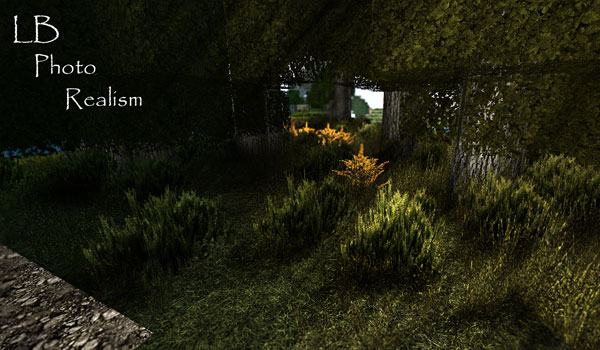
Bueno, este pack de texturas es LB Photo Realism, es un pack súper genial pero la computadora en el que se use debe ser rápida. Descargan MC Patcher 1.5.2 (en publicaciones anteriores ya lo puse), descargan LB Photo Realism Texture Pack 1.5.2 y buscan en el buscador %appdata%, abren la carpeta .minecraft/texturepacks pegan el archivo .zip descargado del pack de texturas dentro de la carpeta texturepacks y finalmente ejecutan MC Patcher y pulsan en “Patch”.
Link: http://adf.ly/8BNQH
Well, this pack of textures is LB Photo Realism, is a super cool pack, but the computer in the one that is used must be fast. First download MC Patcher 1.5.2 (in previous publications already I put it), download LB Photo Realism Texture Pack 1.5.2 and search in the searcher for %appdata%, open the folder .minecraft/texturepacks and paste the file .zip downloaded of the pack of textures inside the folder texturepacks and finally execute MC Patcher and pulse "Patch".
Link: http://adf.ly/8BNQH
Well, this pack of textures is LB Photo Realism, is a super cool pack, but the computer in the one that is used must be fast. First download MC Patcher 1.5.2 (in previous publications already I put it), download LB Photo Realism Texture Pack 1.5.2 and search in the searcher for %appdata%, open the folder .minecraft/texturepacks and paste the file .zip downloaded of the pack of textures inside the folder texturepacks and finally execute MC Patcher and pulse "Patch".
Link: http://adf.ly/8BNQH
lunes, 10 de junio de 2013
Bueno, perdón por la tardanza pero estoy en exámenes, por eso quizá mi actividad por las próximas 2 semanas no sea mucha. Pero bueno, este pack de texturas se llama Soartex Fanver, descargan MC Patcher 1.5.2 (en publicaciones anteriores ya lo puse), descargan Soartex Fanver Texture Pack 1.5.2, buscan en el buscador %appdata%, abren Roaming, luego .minecraft, luego texturepacks, pegan el archivo .zip descargado del pack de texturas dentro de “texturepacks” , ejecutan MC Patcher y pulsan “Patch” al pack de texturas.
Link: http://adf.ly/5Sz0r
Well, sorry for the lateness but I am in exams, that is the cause that probably my activity for the next 2 weeks is not going to be so much, sorry. This pack of textures is called Soartex Fanver, download MC Patcher 1.5.2 (in previous publications already I put it), download Soartex Fanver Texture Pack 1.5.2, look in the searcher for %appdata%, open Roaming, then .minecraft, then texturepacks, paste the file .zip downloaded of the pack of texture inside "texturepacks", execute MC Patcher and press "Patch" to the pack of textures.
Link: http://adf.ly/5Sz0r
Well, sorry for the lateness but I am in exams, that is the cause that probably my activity for the next 2 weeks is not going to be so much, sorry. This pack of textures is called Soartex Fanver, download MC Patcher 1.5.2 (in previous publications already I put it), download Soartex Fanver Texture Pack 1.5.2, look in the searcher for %appdata%, open Roaming, then .minecraft, then texturepacks, paste the file .zip downloaded of the pack of texture inside "texturepacks", execute MC Patcher and press "Patch" to the pack of textures.
Link: http://adf.ly/5Sz0r
miércoles, 5 de junio de 2013
Bueno, perdón por la demora pero estoy a punto de entrar a los exámenes de proceso y debo estudiar. Unas cuantas personas me pidieron que suba packs de texturas, para eso se necesita el MC Patcher 1.5.2
Descargan MC Patcher1.5.2, ejecutan e indican la ruta de instalación de vuestro Minecraft y finalmente pulsan “Patch”. Les digo que para poner packs de texturas con este programa, el minecraft no debe estar modificado, osea que no debe tener ningún mod, debe estar como cuando se lo descargaron.
PD: No crean que ya no subiré ningún juego, subiré juegos nuevos pero por ahora doy estos cargadores de mods y de texturas para que cuando suba un mod o una textura nueva, puedan ejecutarla correctamente.
Link: http://adf.ly/2hP31
Well, sorry for the lateness but I am going to enter to the week of exams. A few persons asked me to raise packs of textures, for it its needed the MC Patcher 1.5.2 Download MC Patcher 1.5.2, execute and indicate the route of installation of your Minecraft and finally they touch "Patch". I say to you that to put packs of textures with this program, minecraft must not be modified, so it must not have any mod, it must be as when you downloaded it.
PD: Do not believe that already I will not raise any game, I will raise new games but for the present I give these loaders of mods and of textures in order that when I raise a mod or a new texture, you can execute it correctly.
Link: http://adf.ly/2hP31
Descargan MC Patcher1.5.2, ejecutan e indican la ruta de instalación de vuestro Minecraft y finalmente pulsan “Patch”. Les digo que para poner packs de texturas con este programa, el minecraft no debe estar modificado, osea que no debe tener ningún mod, debe estar como cuando se lo descargaron.
PD: No crean que ya no subiré ningún juego, subiré juegos nuevos pero por ahora doy estos cargadores de mods y de texturas para que cuando suba un mod o una textura nueva, puedan ejecutarla correctamente.
Link: http://adf.ly/2hP31
Well, sorry for the lateness but I am going to enter to the week of exams. A few persons asked me to raise packs of textures, for it its needed the MC Patcher 1.5.2 Download MC Patcher 1.5.2, execute and indicate the route of installation of your Minecraft and finally they touch "Patch". I say to you that to put packs of textures with this program, minecraft must not be modified, so it must not have any mod, it must be as when you downloaded it.
PD: Do not believe that already I will not raise any game, I will raise new games but for the present I give these loaders of mods and of textures in order that when I raise a mod or a new texture, you can execute it correctly.
Link: http://adf.ly/2hP31
sábado, 1 de junio de 2013
Bueno, este mod es el mod de Herobrine, un amigo mío me lo pidió y como soy buena persona, lo pongo. Descargan Modloader1.5.2 o Minecraft Forge API1.5.2 (En publicaciones anteriores ya los puse), descargan el mod Herobrine1.5.2, buscan en el buscador %appdata%, abren Roaming, y luego .minecraft/bin/minecraft.jar, copian y pegan los archivos de Modloader o de Minecraft Forge API dentro de minecraft.jar (sugiero que con WinRar), borran la carpeta META-INF, extraen el contenido del archivo descargado y ejecutan el autoinstalador “EasyModInstaller.jar” y pulsan “Install”.
Well, this mod is the mod of Herobrine, a friend asked for it to me and since I am a good person, I put it. First download Modloader1.5.2 or Minecraft Forge API1.5.2 (In previous publications already I put them), download the mod Herobrine1.5.2, then search in the searcher %appdata%, open Roaming, and then .minecraft/bin/minecraft.jar, copy and paste the files of Modloader or Minecraft Forge API inside minecraft.jar (I suggest with WinRar), then erase the folder META-INF, finnaly extract the content of the downloaded file and execute the autoinstaller "EasyModInstaller.jar" and click "Install".
jueves, 30 de mayo de 2013
Bueno, este es otro cargador de Mods llamado Minecraft Forge API. Descargan Minecraft Forge 1.5.2. Buscan en el buscador %appdata% y abren la carpeta Roaming, luego abren el archivo .minecraft/bin/minecraft.jar. Pegan archivos de Minecraft Forge dentro de “minecraft.jar”. Y luego borran la carpeta META-INF.
Link: http://adf.ly/673885/http://files.minecraftforge.net/minecraftforge/minecraftforge-universal-1.5.2-7.8.0.688.zip
Well, this one is another loader of Mods called Minecraft Forge API. You download Minecraft Forge 1.5.2. Then search for %appdata % in the searcher and open the folder Roaming, then open the file .minecraft/bin/minecraft.jar. You must copy and paste Minecraft Forge's files inside "minecraft.jar". And then erase the folder META-INF.
Link: http://adf.ly/673885/http://files.minecraftforge.net/minecraftforge/minecraftforge-universal-1.5.2-7.8.0.688.zip
Well, this one is another loader of Mods called Minecraft Forge API. You download Minecraft Forge 1.5.2. Then search for %appdata % in the searcher and open the folder Roaming, then open the file .minecraft/bin/minecraft.jar. You must copy and paste Minecraft Forge's files inside "minecraft.jar". And then erase the folder META-INF.
Link: http://adf.ly/673885/http://files.minecraftforge.net/minecraftforge/minecraftforge-universal-1.5.2-7.8.0.688.zip
martes, 28 de mayo de 2013
Bueno, hay muchos Mods para Minecraft, y muchos necesitan un programa para abrirlos, así que subiré unos 2 o 3 cargadores de Mods. Este es el Modloader para Minecraft 1.5.2.
¿Cómo instalar Modloader para Minecraft 1.5.1 y 1.5.2? Descargar Modloader 1.5.2, abrir el archivo Roaming (en el buscador %appdata%).minecraft/bin/minecraft.jar, pegar archivos de Modloader dentro de “minecraft.jar”, borrar carpeta META-INF.
¡Ya tenemos el cargador de mods Modloader!
PD: Los que no lo quieran leer, no lo hagan, no es importante. Resulta que recibí algunos mensajes privados diciendo que les gustaba la chica de Bioshock Infinite y que querían más fotos de ella, yo les respondí que este blog no es dedicado a eso, solo digo que se llama Elizabeth y si quereis busquen imágenes por su cuenta. Ven, les dije que no era importante XD.
Link de Modloader 1.5.2: http://adf.ly/1849S
Well, there are many Mods for Minecraft, and many people need a program to open them, so I will raise approximately 2 or 3 loaders of Mods. This one is the Modloader for Minecraft 1.5.2. How to install Modloader for Minecraft1.5.2? Download Modloader 1.5.2, open the file Roaming (in the searcher %appdata%).minecraft/bin/minecraft.jar, copy and paste Modloader's files inside "minecraft.jar", and erase META-INF folder. Already we have the loader of mods Modloader!
PD: those who do not want to read it, do not do it, it is not important. It turns out that I received some private messages saying that they liked the girl of Bioshock Infinite and that they wanted more photos of her, I answered them that this blog is not dedicated to it, only I say that she is called Elizabeth and if you want photos from her, you should look for images yourself. See, I said that it was not important XD.
Link of Modloader 1.5.2: http://adf.ly/1849S
¿Cómo instalar Modloader para Minecraft 1.5.1 y 1.5.2? Descargar Modloader 1.5.2, abrir el archivo Roaming (en el buscador %appdata%).minecraft/bin/minecraft.jar, pegar archivos de Modloader dentro de “minecraft.jar”, borrar carpeta META-INF.
¡Ya tenemos el cargador de mods Modloader!
PD: Los que no lo quieran leer, no lo hagan, no es importante. Resulta que recibí algunos mensajes privados diciendo que les gustaba la chica de Bioshock Infinite y que querían más fotos de ella, yo les respondí que este blog no es dedicado a eso, solo digo que se llama Elizabeth y si quereis busquen imágenes por su cuenta. Ven, les dije que no era importante XD.
Link de Modloader 1.5.2: http://adf.ly/1849S
Well, there are many Mods for Minecraft, and many people need a program to open them, so I will raise approximately 2 or 3 loaders of Mods. This one is the Modloader for Minecraft 1.5.2. How to install Modloader for Minecraft1.5.2? Download Modloader 1.5.2, open the file Roaming (in the searcher %appdata%).minecraft/bin/minecraft.jar, copy and paste Modloader's files inside "minecraft.jar", and erase META-INF folder. Already we have the loader of mods Modloader!
PD: those who do not want to read it, do not do it, it is not important. It turns out that I received some private messages saying that they liked the girl of Bioshock Infinite and that they wanted more photos of her, I answered them that this blog is not dedicated to it, only I say that she is called Elizabeth and if you want photos from her, you should look for images yourself. See, I said that it was not important XD.
Link of Modloader 1.5.2: http://adf.ly/1849S
Suscribirse a:
Entradas (Atom)